At a home office, the change can be easy to picture: a laptop on the desk, shoulders rounding, and another long stretch in the same chair. That everyday discomfort helps explain why are ergonomic kneeling chairs becoming popular in 2026. Remote and hybrid work keep more people seated for hours, while interest in posture-friendly furniture continues to grow. Still, popularity is not proof of a health benefit.
Kneeling chairs use a sloped seat and padded supports for the shins, shifting some body weight forward. Their design may encourage a more open hip angle and a different sitting position. Ergonomics researcher Alan Hedge is often associated with the practical reminder, “The best posture is the next posture.” The idea matters here: changing positions can be more useful than expecting one chair to solve every problem. A kneeling chair is one option, not a universal fix.
This article explores the appeal, evidence, and trade-offs behind the trend. Some users appreciate the upright feel; others find pressure on their knees or shins uncomfortable, especially during long sessions. Fit, desk height, and the ability to move freely all matter. There is no perfect chair for everyone. Before buying, consider your body, work habits, and return policy, and try the chair gradually if possible. The trend deserves attention, but a little skepticism is healthy. A comfortable setup should support movement, not lock you into a new posture.
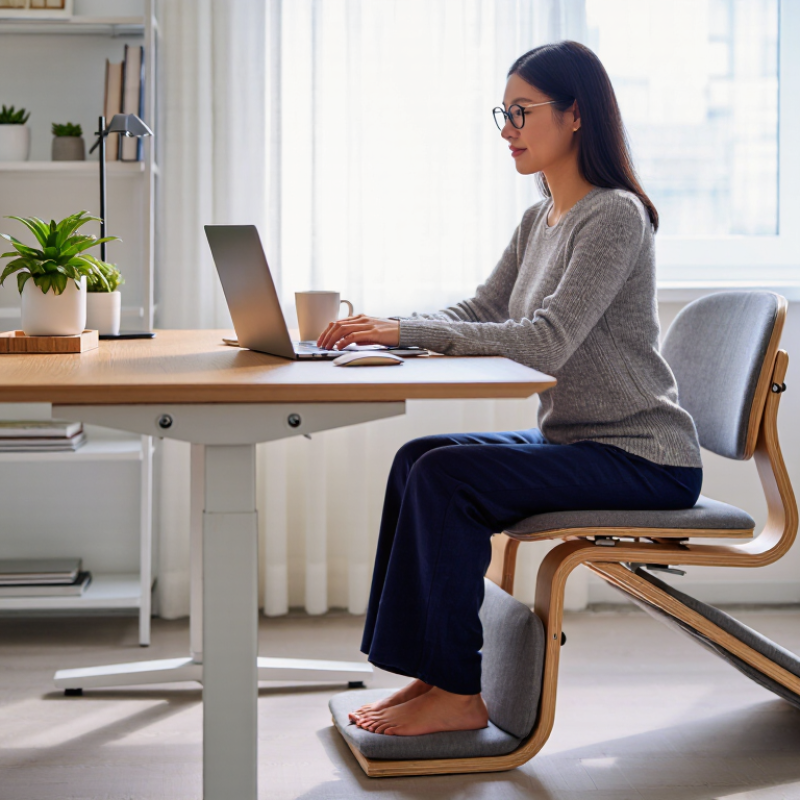
A kneeling chair changes how your weight meets the seat. Its sloped seat tilts the pelvis forward, while padded supports rest beneath the shins. You are not meant to kneel on your knees. The supports help steady your lower legs as your hips sit slightly higher than they might on a conventional chair.
That angle can make it easier to keep the trunk upright, but it does not hold good posture in place. Your shoulders should stay relaxed, and your feet should have a comfortable place to rest. Shin pads should support the lower legs without pressing sharply against the knees or ankles. A useful fit feels stable, not restrictive. Small adjustments matter.
Try it for short periods at first. Notice pressure, tingling, or a growing urge to shift. That feedback counts. Kneeling chairs can reduce slouching for some people, yet they may feel tiring or uncomfortable for others. They also do not suit every desk height or body shape. I would not treat one as a cure for back pain; changing positions and taking brief movement breaks remain sensible habits.
The forward-tilted seat encourages a more open hip angle, while the shin supports provide an additional point of contact. The ranges below are approximate illustrations, not universal specifications or a guarantee of better posture; angles vary by chair and person. Change position regularly and use the chair only if it feels comfortable.
1.71 billion people WHO estimates that 1.71 billion people live with musculoskeletal conditions, a broad group affecting muscles, joints, bones, and related tissues. This figure does not mean office chairs cause MSDs. Conditions can have many contributors, including age, injury, illness, and work demands. Still, the scale helps explain why people are paying closer attention to daily comfort. A stiff lower back after a long video call or shoulders tightening toward a laptop can feel familiar, but neither sensation is a diagnosis. The number is sobering.
Ergonomic kneeling chairs are attracting interest as one possible way to vary sitting posture. Their angled seat encourages an open hip position and shifts some weight toward the padded shin supports. That may feel comfortable for some people, but pressure on the knees or shins can become tiring, especially during long sessions. The trade-off is easy to overlook. A chair alone cannot prevent or treat MSDs, and no single posture suits everyone. Try a short sitting period, adjust the desk so the shoulders stay relaxed, and take movement breaks. Even then, personal comfort is not proof of medical benefit.
Why Are Ergonomic Kneeling Chairs Becoming Popular in 2026?
Kneeling chairs are drawing interest because they change how the body meets the desk. Their angled seat places the hips slightly forward, while padded supports carry some weight through the shins. For some people, this position makes slouching less comfortable and encourages a more upright posture. That can help.
The evidence is not a clear endorsement. Research on kneeling-style seating is limited, and results can differ between people and tasks. An upright position does not automatically mean less back pain. A chair may feel comfortable during a short writing session but tiring after hours of typing. Comfort is personal.
There are trade-offs. Pressure on the knees or shins may build, especially if the supports are too high or poorly padded. Getting up and moving around can also feel less effortless than with a standard chair. Fit matters: feet should rest comfortably, and the supports should not press sharply into the lower legs. Try short sessions first, then alternate positions. Not a cure. The less tidy point is that even a well-adjusted chair cannot replace movement, breaks, or a workspace suited to the person using it.
Why Are Ergonomic Kneeling Chairs Becoming Popular in 2026?
Who May Benefit: Matching Chair Design to Work Tasks and Body Fit
A kneeling chair may suit people who want a different seated posture during focused desk work. Its angled seat shifts some body weight toward padded shin supports. It does not remove pressure or guarantee better posture. Fit matters. If the seat is too high, the feet may not rest comfortably; if the pads press sharply into the shins, the chair may become distracting.
Work habits matter as much as chair design. Someone typing or sketching for short stretches may appreciate the forward-leaning position. People who move between a keyboard, phone, and papers may find it less convenient. Not for everyone. Many users benefit from switching between sitting, standing, and walking rather than staying in one posture all day. A kneeling chair can be one option in that mix, not a complete solution.
Body fit deserves a practical trial. Check whether the desk allows relaxed shoulders and elbows near the work surface. Make sure the knee pads support the lower legs without forcing the knees into a painful angle. If possible, try the chair briefly and adjust it before committing. The awkward part is that comfort can fade after an hour, even when the first few minutes feel good. Anyone with existing knee, hip, or back concerns may want professional guidance before changing seating habits.
| Work Task | Potentially Suitable When | Chair Features to Consider | Body-Fit Check | Limitations and Practical Advice |
|---|---|---|---|---|
| Short computer sessions, writing, or focused reading | You want to try a different seated posture for brief work periods and can change position comfortably. | Adjustable seat height, stable base, padded seat and shin supports, and a setup that lets you reach the desk without leaning. | Feet should rest comfortably, and the shin pads should support the lower legs without pressing directly on the knees. | Start with short sessions. A kneeling chair does not require or guarantee an upright posture; adjust the desk and monitor as needed. |
| Alternating between sitting and standing | Your workday already includes posture changes, and you want another position rather than a single chair for all-day use. | Easy height adjustment and a stable design that is simple to move or switch away from. | Check that you can enter and exit the chair easily and that its height works with your desk or workstation. | Changing posture regularly is more practical than remaining in any one position for long periods. Keep a conventional chair available if useful. |
| Tasks requiring frequent reaching or turning | The work area is compact and most frequently used items are within easy reach. | A stable base and a layout that allows the chair to move or be repositioned without awkward twisting. | Make sure the chair does not restrict comfortable movement and that you can reach essential items without stretching. | Some kneeling-chair designs offer less freedom to reposition than a conventional office chair. Do not use the chair to compensate for a poorly arranged workstation. |
| Long, uninterrupted desk-work blocks | You can take regular movement breaks and alternate with another comfortable position. | Well-padded, appropriately sized supports and adjustments that suit your desk height and leg length. | During a trial, watch for increasing pressure, numbness, tingling, or discomfort in the knees, shins, hips, or lower legs. | A kneeling chair may not suit continuous all-day use. Comfort varies, and research does not establish it as universally better than other office chairs. |
| Work for people with knee, lower-leg, or mobility concerns | Only after confirming that the position and transfers are comfortable and appropriate for the individual. | Easy entry and exit, stable construction, and adjustability; avoid designs that force pressure onto a sensitive area. | Consider knee range of motion, balance, circulation, and whether kneeling or getting up causes symptoms. | People with knee pain, recent injury or surgery, reduced sensation, circulation concerns, or difficulty transferring should seek individualized clinical advice before use. |
| Shared workstations or multiple users | Different users can adjust the chair correctly each time and the workstation can be set up for each person. | Clear adjustment controls and a useful range of seat-height and support-position settings. | Each user should independently confirm a comfortable seat height, shin-pad contact, and desk reach. | A fixed-size chair may not fit everyone. Check the adjustment range and return or trial policy before choosing a model. |
General guidance: Kneeling chairs are an alternative seating option, not a treatment for back pain or a guaranteed ergonomic improvement. Fit depends on the person, chair adjustments, workstation setup, and duration of use.
An ergonomic kneeling chair may change how your hips and back feel, but it is not automatically safer than a conventional chair. Check that the seat and shin supports adjust independently, and that your feet can rest comfortably without pressure building across your knees. Try it for a short period before using it for a full workday. Fit comes first. A chair that forces you to lean forward or brace your shins is a poor match, even if its posture looks upright.
Movement matters more than holding one “perfect” position. OSHA’s Computer Workstations eTool recommends neutral posture, workstation adjustments, and changing position during the day; it does not endorse kneeling chairs as a universal solution. The Bureau of Labor Statistics reported about 2.6 million nonfatal workplace injury and illness cases in private industry in 2023. That broad figure is not proof that a kneeling chair prevents injuries. Use it as a reminder to assess your whole setup: monitor height, keyboard reach, and space to shift positions. Small moves matter. Stand briefly, walk, or return to a supportive chair if your knees, ankles, or back become uncomfortable. An imperfect reality: switching chairs alone will not fix a desk that is too high.
Its sloped seat tilts the pelvis forward, with padded supports under the shins. This can make slouching less comfortable. It does not hold posture in place.
No. Your shins rest on the padded supports while your hips sit slightly higher. The pads should not press sharply against your knees or ankles.
It may help some people sit more upright, but it is not a cure for back pain. Evidence is limited, and people respond differently.
Start with a short session, such as writing at your desk. Notice pressure, tingling, or a growing urge to shift. Those signals matter.
The chair should feel stable, not restrictive. Your feet need a comfortable resting place, and the shin pads should support your lower legs without sharp pressure.
It may feel tiring during hours of typing, even if it feels fine during a brief task. Alternate positions and take movement breaks.
No. Sitting upright does not guarantee less back pain, and comfort varies by person and task. A tidy posture is not the whole story.
Try changing the fit or switching to another seating position. Some bodies and desk setups simply do not suit this chair. That is worth considering.
Why are ergonomic kneeling chairs becoming popular in 2026? Growing attention to musculoskeletal disorders—estimated by the World Health Organization to affect 1.71 billion people worldwide—has prompted more people to consider how their seating supports everyday work. A kneeling chair uses an angled seat and shin supports to distribute body weight differently from a conventional chair and may encourage a more upright posture. However, it does not guarantee better posture or prevent discomfort, and research on its benefits has limitations.
Whether this style suits someone depends on body fit, comfort, and the tasks they perform. It may work best for shorter periods or as one option in a varied workday rather than as a fixed all-day solution. When choosing a chair, look for suitable adjustability, stable support, and room to change positions. Pair it with a well-arranged workstation, following general OSHA guidance on fitting work equipment to the user, and take regular movement breaks.

Mingkei Furniture